
Send a notification to your followers
Tell everyone who follows your company about new cars or news.
- For
- Rental companies
- Where
- Website / Web panel
- 2 min
Goal: Bring past clients back.
Steps
Step 1: In the web panel open Notify Followers. See how many followers you have under Followers.
Step 2: Write a short Title and Message. Add a link if you want.
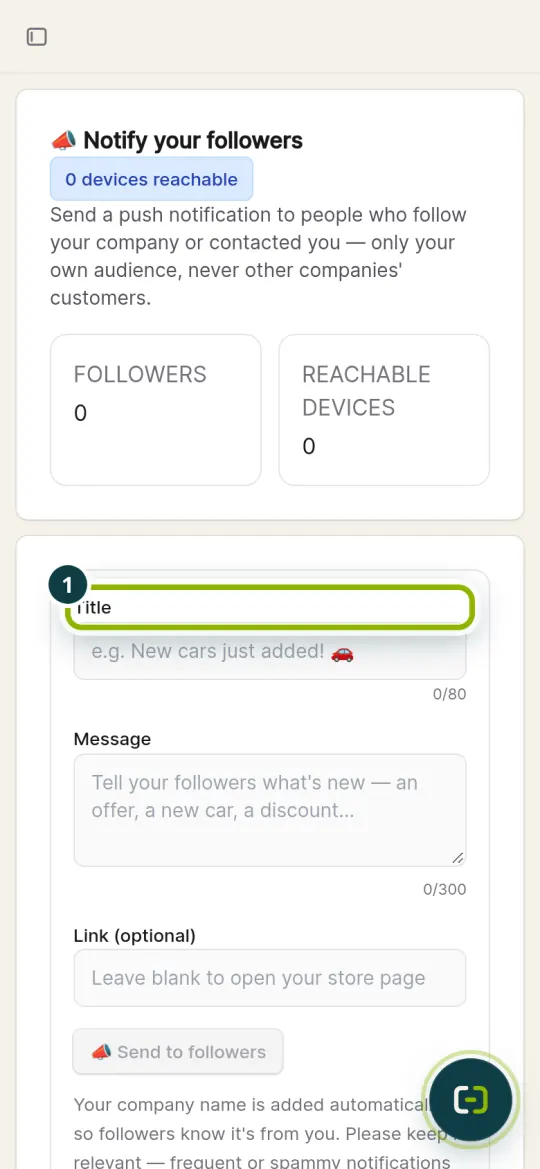
Notify your followers page in the web panel with the Title box marked Step 3: Tap “Send to followers”.
Tips
- Followers get it as a notification in the RentoLine app.
- Send only real news. Too many messages make people unfollow.
Related guides
RentoLine has no online booking and no payments: you agree and pay directly with the rental company.
Still need help?
Our team answers by free call, on WhatsApp (+44 7577 563300), by email and in chat.