
Understand a car page
Prices, deposit, specs, terms and offers — what each part of a car page means.
- For
- Renters
- Where
- App · Website
- 2 min
Goal: Know the full cost and terms before you contact the company.
Steps
Step 1: Tap a car to open it. Swipe the photos, or tap one to see it full screen.
Step 2: Check the price per day. Weekly and monthly prices are usually lower per day. “Ask for price” means the company tells you the price.
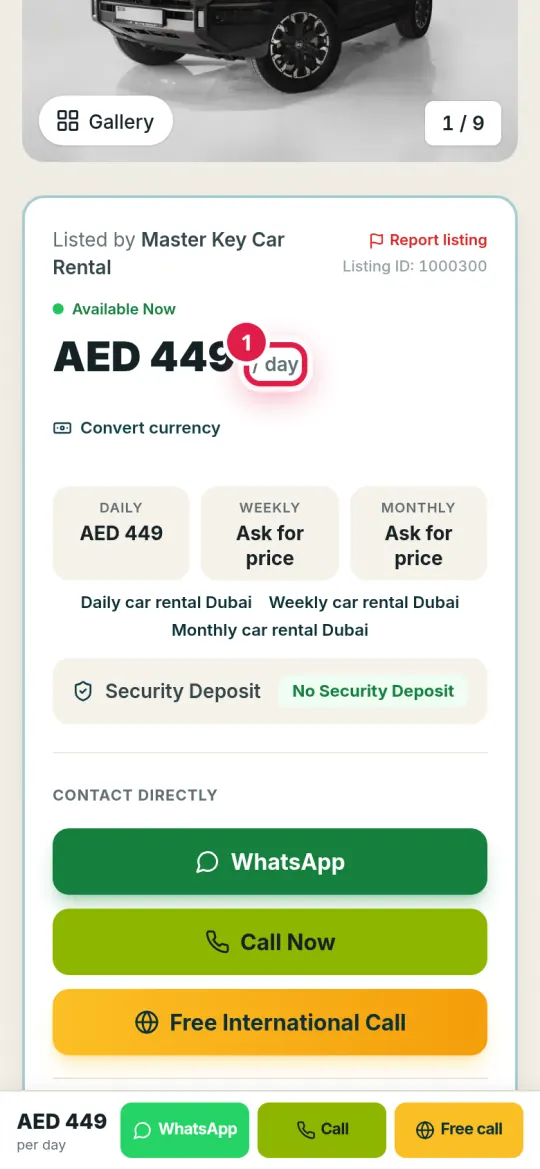
Car page price card showing the price per day, weekly and monthly prices and the security deposit Step 3: Check the security deposit, or “No Security Deposit”.
Step 4: Read Specifications, Description, Delivery and rental terms (km limit, minimum days, insurance).
Step 5: If you see an offer box with a code, mention the code when you call or WhatsApp the company.
Tips
- Tap Share to send the car to a friend.
Questions
Is the price final?
The company sets the price. Confirm the final price, extras and deposit with the company before you rent.
Related guides
RentoLine has no online booking and no payments: you agree and pay directly with the rental company.
Still need help?
Our team answers by email.