
Answer calls and call back missed calls
Free in-app calls ring on your phone. Missed ones wait in Calls so you can call back.
Эта инструкция доступна на английском и арабском.
- Для кого
- Прокатные компании
- Где
- Приложение · Сайт / Веб-панель
- 2 мин
Цель: Never lose a client because of a missed call.
Шаги
Шаг 1: When a client makes a free call, your phone rings like a normal call, even when the app is closed. Answer it.
Шаг 2: Linked an office desk phone? The call can ring there too — see “Link your office desk phone”.
Шаг 3: On the Vendor tab tap Calls to see your call history.
Шаг 4: Missed a call? Tap Missed calls on the Vendor tab and call the client back.
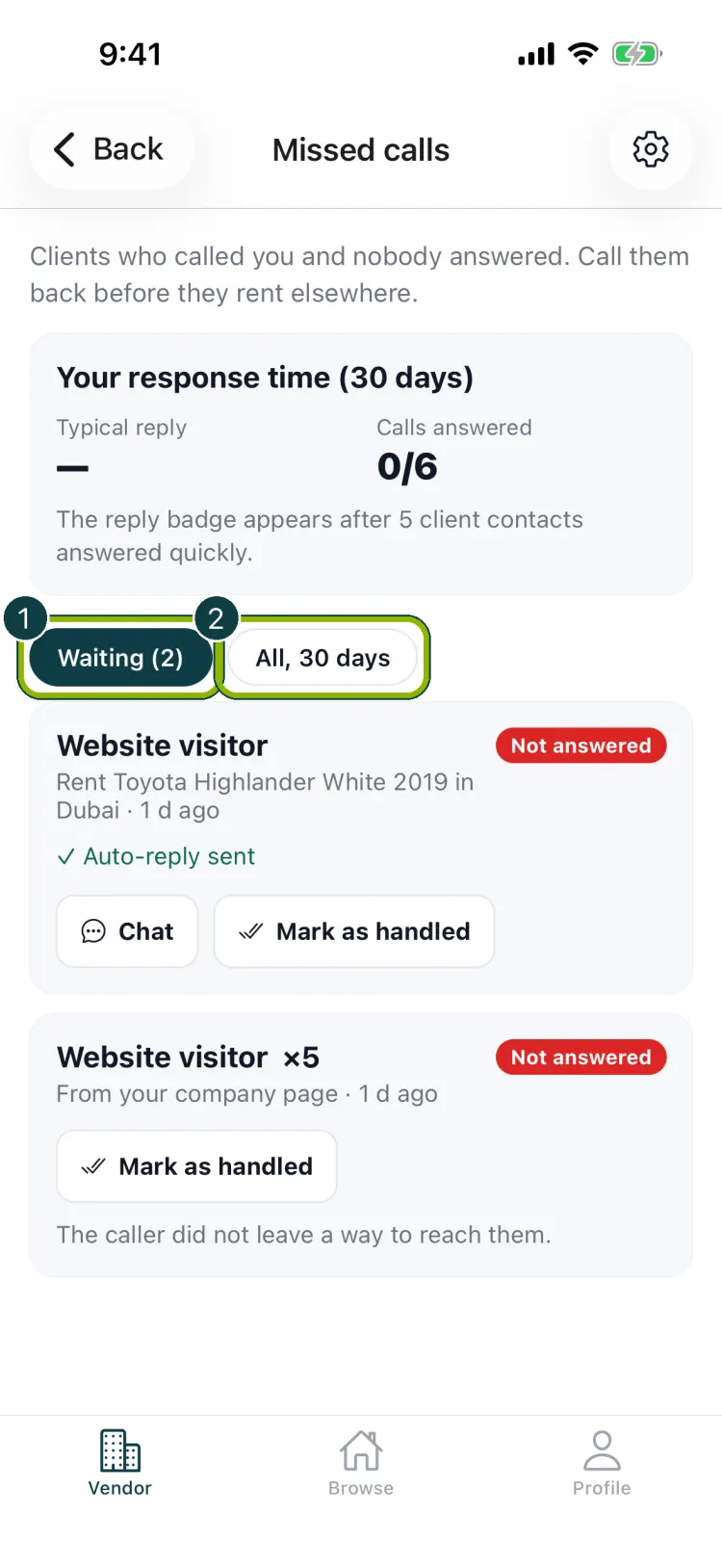
Missed calls screen with Waiting and All 30 days marked
Советы
- Allow notifications and the microphone for RentoLine, or calls cannot ring.
Вопросы
Do free calls cost me anything?
No. They use the internet and are free for you and the client.
Похожие инструкции
На RentoLine нет онлайн-бронирования и оплаты: вы договариваетесь и платите напрямую прокатной компании.
Нужна помощь?
Наша команда отвечает по бесплатному звонку, в WhatsApp (+44 7577 563300), по электронной почте и в чате.