
Call back missed calls and send an auto-reply
Every client who called and got no answer waits in Missed calls. Call them back before they rent elsewhere.
Эта инструкция доступна на английском и арабском.
- Для кого
- Прокатные компании
- Где
- Приложение
- 3 мин
Цель: Answer every missed call and keep a fast reply badge.
Шаги
Шаг 1: On the Vendor tab tap Missed calls in your tools, or the Missed calls row when it shows at the top.
Шаг 2: Waiting shows calls nobody handled yet. Tap Call back free, Call, WhatsApp or Chat.
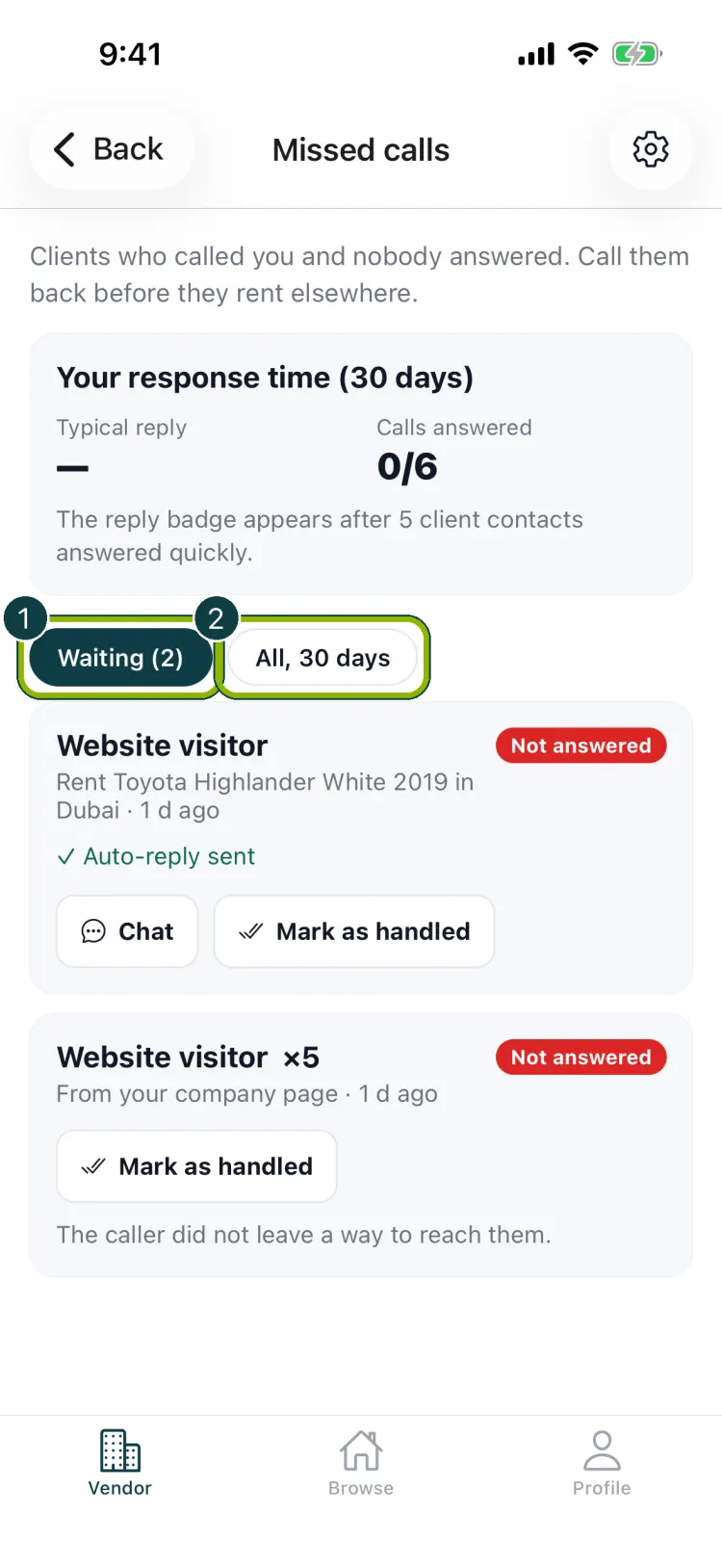
Missed calls screen with Waiting and All 30 days marked Шаг 3: When you are done, tap Mark as handled.
Шаг 4: Open Missed call settings: get an e-mail for every missed call, and send the caller an automatic message (the default one or your own).
Шаг 5: Your response time (30 days) is at the bottom. Fast answers give you a reply badge on your company page.
Советы
- “Your phone did not ring” means no phone was signed in for your company at that moment. Keep the app signed in.
- The automatic message to callers is a Plus tool. Your Plan page shows what your plan includes.
Похожие инструкции
На RentoLine нет онлайн-бронирования и оплаты: вы договариваетесь и платите напрямую прокатной компании.
Нужна помощь?
Наша команда отвечает по бесплатному звонку, в WhatsApp (+44 7577 563300), по электронной почте и в чате.