
Your short link and QR code
Share rentoline.com/@yourname and print a QR card so clients find all your cars.
Эта инструкция доступна на английском и арабском.
- Для кого
- Прокатные компании
- Где
- Приложение · Сайт / Веб-панель
- 3 мин
Цель: Bring clients to your page from anywhere.
Шаги
Шаг 1: In the app tap Company profile on the Vendor tab and find “My link”. Tap Share, or long-press to copy.
Шаг 2: Want a shorter name? In the app tap Edit next to your username (Profile → My link). In the web panel (Rental Company) tap “Request a shorter name”. Use a–z, 0–9, - and _, then send it for approval.
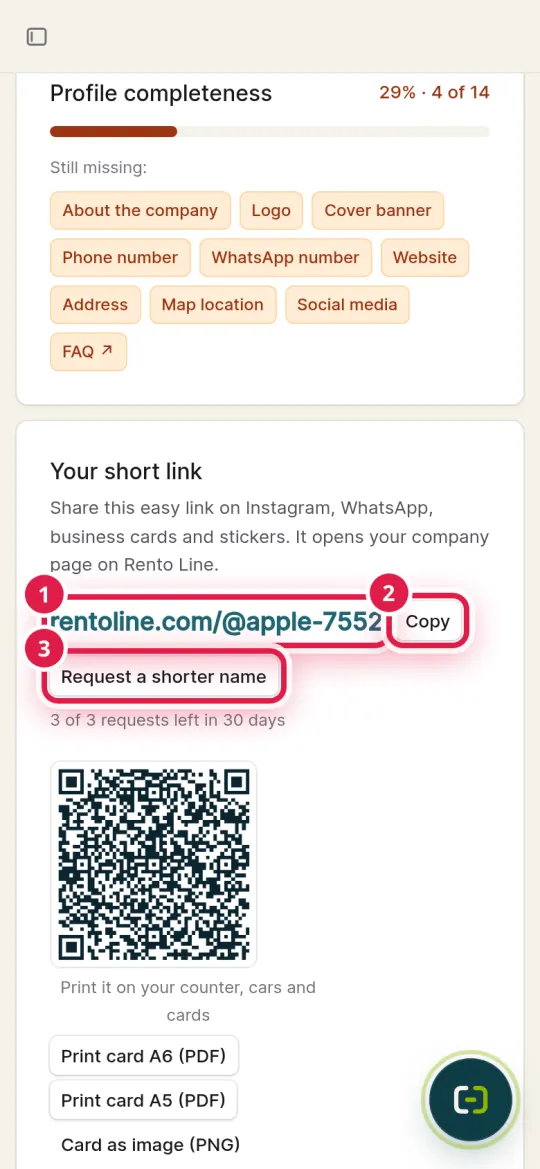
Company profile in the RentoLine web panel: “Your short link” rentoline.com/@apple-7552 with the Copy and “Request a shorter name” buttons marked Шаг 3: Print it: choose “Print card A6 (PDF)”, A5, “Card as image (PNG)” or “QR only (PNG)”.
Шаг 4: Put the QR card on your desk, in your cars and on your social media.
Советы
- Your old link keeps working when the new name is approved.
Похожие инструкции
На RentoLine нет онлайн-бронирования и оплаты: вы договариваетесь и платите напрямую прокатной компании.
Нужна помощь?
Наша команда отвечает по бесплатному звонку, в WhatsApp (+44 7577 563300), по электронной почте и в чате.