
Get the Verified badge
Upload a valid trade licence. When we approve it, your cars go live with the Verified badge.
Эта инструкция доступна на английском и арабском.
- Для кого
- Прокатные компании
- Где
- Сайт / Веб-панель
- 2 мин
Цель: Show clients that your company is real.
Шаги
Шаг 1: In the app tap Company profile on the Vendor tab (Company in older versions) and scroll to Trade licence. The card shows Valid, Expired or Incomplete.
Шаг 2: Tap Change expiry date to set the date on your licence.
Шаг 3: Tap Upload new document and choose a clear photo or PDF of your licence.
Шаг 4: Tap Send for review. Until RentoLine approves it, your approved date and document stay in use.
Шаг 5: On the web panel you can do the same in Settings → Trade License.
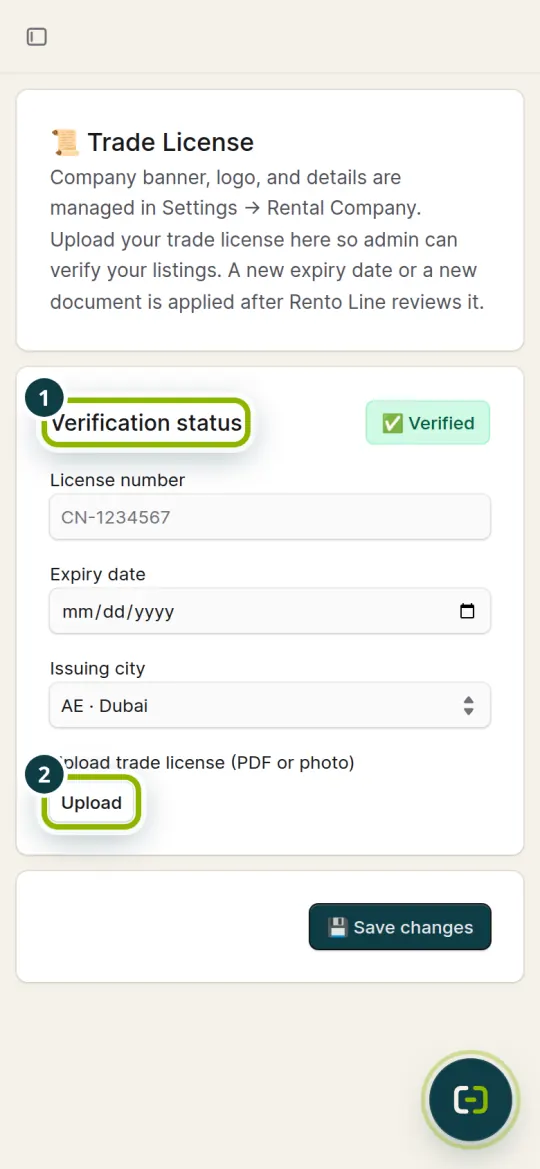
Trade License page in the web panel with the verification status and the Upload button marked
Советы
- Until the licence is approved, your cars stay as drafts.
- Saving the licence again starts the review again.
Вопросы
My licence expired. What now?
Upload the renewed licence on the same page. The badge comes back after review.
Похожие инструкции
На RentoLine нет онлайн-бронирования и оплаты: вы договариваетесь и платите напрямую прокатной компании.
Нужна помощь?
Наша команда отвечает по бесплатному звонку, в WhatsApp (+44 7577 563300), по электронной почте и в чате.